7 min read
Aug 24, 2026
Key Takeaways
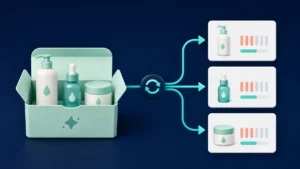
Inventory management on a product-by-product basis is quite simple. One customer makes a purchase, and your inventory gets reduced by one. A bundle complicates this system.
For example – You have a skin care bundle package that comprises a cleanser, serum, and moisturizer. Moreover, you also sell the serum on its own, outside the bundle.
Shopify Inventory Sync can be the answer to your problem. The inventory sync option helps ensure the products in your bundle are always linked to the orders your customers place. If your customers purchase a bundle package, the inventory level for those products will change accordingly.
Here is something else you should know about your stock other than the bundle:
A good inventory sync software will help you better understand these relationships. With real-time inventory sync, you can easily manage stock through orders and maintain accurate Shopify inventory tracking. If you are thinking about how to track inventory on Shopify while selling bundles, you need to consider the SKUs of each item.

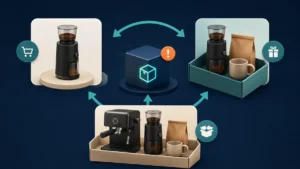
The issue generally arises when the same item is sold through multiple channels. For instance, you may sell a coffee grinder separately, as part of a coffee starter kit, and in a larger coffee kit. Now consider that five customers buy the larger kit, but other customers buy the coffee grinder separately. If you don’t account for those sales against the same inventory base, your inventory availability may no longer match reality.
This can cause issues with:
A merchant can assume that there are ten units of the bundle because the bundle itself hasn’t been sold ten times. However, if the product within the bundle has been ordered before, there is not enough stock left to fill ten bundles anymore. That’s why stock sync becomes important. A bundle isn’t always a pile of products located in a warehouse. More often, a bundle is a combination of products, each with its own inventory. Accurate stock sync for Shopify allows you to keep this connection clear.
Inventory apps may work well for one kind of bundle but not another. Before you go for any Shopify bundle app, make sure it works for your bundles.
Under BOGO or “Buy X Get Y” discounts, the number of units you remove from inventory may not match the amount the customer paid. Let’s say you are running a “Buy 1 Get 1” deal; you give away two units total, and your inventory should cover that. Try running your exact promotion and see how many units get discounted.
In the Shopify Mix and Match bundle, customers can determine the bundle composition. For instance, the merchant can allow consumers to select any three products from the category of snacks, skin care products, and accessories. Since customers can select many combinations of products, the inventory system needs to track individual items.
The build your own bundle (BYOB) approach offers even more options for the customer.
This could mean that the customer can pick out:
In this case, the result will appear as one item for the customer, but several items will be sold from the inventory. For this reason, you need to ensure that the inventory app supports Shopify product bundles. You shouldn’t rely only on the features list. If your store uses Buy One Get One Free, Mix and Match, or Build Your Own Bundle features, make sure your Shopify inventory management solution supports them.
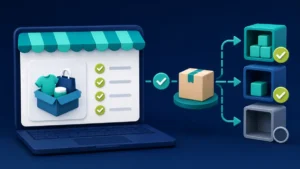
The feature list tells you which features the software should have in theory. A test order will inform whether the software works in practice in your specific case. Before deciding which inventory management app to choose, test the software with scenarios possible at your store.
Test it first with a product that can be sold in several forms:
This will help you understand whether the app understands inventory sharing instead of treating each bundle as a separate product. Now test your more complex product listings.
Finally, reduce one component to zero stock and see what happens. Is your bundle unavailable? Is your individual product displaying the right stock level? In short, stock availability for your shoppers must be accurate enough.
Once you’ve identified the bundle types and inventory relationships your store should handle, the next step is choosing a system that supports them while reducing additional manual work. BundleSuite links bundles with the corresponding products and SKUs. Thus, product inventory won’t depend on the offer it is sold in; it will belong to the product itself, regardless of the offer.
For instance, if your coffee shop sells coffee beans individually, as part of a starter package, and together with a coffee machine, all these sales influence the inventory of the same coffee beans. Consider this when implementing a product bundling strategy based on your existing products.
BundleSuite supports various bundle types, such as:
This gives merchants flexibility to create different bundles based on purchasing behavior without losing product connection. When comparing Shopify inventory apps, the best way to determine whether a certain app is right for you is to test it with your own inventory. Find the products available for sale and conduct customer scenarios to see how the inventory behaves. This will tell you much more about whether the app fits your needs than a feature list.

Selecting an inventory sync application must start with your store’s selling model. If items are individualized and sold as part of different bundles, your inventory management system must maintain those associations properly. Test your scenarios and select a solution that can work with your bundling system without increasing workload.
BundleSuite is your Shopify-ready bundle builder app for high-converting bundles—BYOB, Mix & Match, Volume Discounts, Kits, Combos, you name it.
Built for merchants who want control, flexibility, and results. BundleSuite is your Shopify-ready bundle builder app for high-converting bundles—BYOB, Mix & Match, Volume Discounts, Kits, Combos, you name it. Built for merchants who want control, flexibility, and results.
BundleSuite is your Shopify-ready bundle builder app for high-converting bundles—BYOB, Mix & Match, Volume Discounts, Kits, Combos, you name it. Built for merchants who want control, flexibility, and results.
There should be synchronization for the same product that is present in different bundles. Inventory availability needs to be updated accordingly, whether the product is sold alone or in bundle form.
One item can appear in multiple bundles while also being sold on its own. Shopify inventory sync ensures these sales affect the same stock.
Test shared products, individual sales, various bundles, BOGO deals, and what happens when a bundle component goes out of stock.
The inventory system must understand that the item is unavailable and whether the bundle it’s part of can still be fulfilled.
It will depend on the app. The merchant needs to see if the inventory system picks up the individual products chosen.
Yes. BundleSuite supports Build Your Own Bundles, Mix and Match, Frequently Bought Together, BOGO, and Tiered discounts, giving merchants different ways to create bundle offers.
Your email address will not be published. Required fields are marked*