
10 min read
Jun 12, 2026
The fixed bundle has a problem: it assumes every customer wants the same combination. Most don’t. Someone buying skincare might already own the cleanser and only need the last two steps. Someone building a snack box wants the flavors they actually like, not the four you picked for them.
This is where the mix and match bundles format earns its place — it gives customers the structure of a bundle with the autonomy of individual shopping. The result, when it’s set up correctly, is higher average order value, lower abandonment, and a purchase experience that feels personalised without requiring any personalisation infrastructure.
This piece covers what Shopify mix and match bundles actually are, why they move AOV numbers in ways fixed bundles don’t always manage, how they apply across apparel, beauty, and food niches, how to set one up using a Shopify bundle builder, and what makes a mix and match page actually convert.
6 things worth knowing before you keep reading:
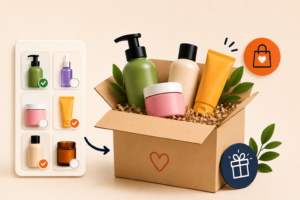
A mix and match bundle is a bundle format where the customer selects the components themselves from a defined product pool, rather than receiving a pre-set combination. The brand sets the rules — pick any 4 from these 20, or build a box of 6 from these categories — and the customer fills in the contents.
This is different from simply buying multiple products. The bundle structure creates a price incentive (usually a discount that activates when the minimum quantity is met) and a contained shopping experience (the customer stays within a defined set rather than browsing the whole catalog). Both of those features matter for conversion.
Shopify mix and match bundles come in a few structural variants:
The bundle builder Shopify experience — the actual page where customers make their selections — is where the format lives or dies. A clunky selection UI kills the format faster than any pricing problem.

The AOV argument for mix and match is straightforward in theory: if you offer a discount for buying four items, customers who were planning to buy two will often round up to four to unlock the saving. In practice it’s a bit more nuanced — but the mechanism is real.
When using mix and match the friction that existed no longer exists. The customer has chosen every item in the bundle, and as such, will have less buyer’s remorse after purchasing items and will be less likely to return them.
Shopify bundle apps that handle this well show the discount progress dynamically — updating in real time as the customer adds items — which keeps the incentive visible throughout the selection process rather than only at checkout.
The mix and match bundle format isn’t equally suited to every product type. These three niches get the most out of it, for distinct reasons:
Bundle products in Shopify for fashion brands typically works best in the basics segment — where customers want multiples of the same product in different colors or sizes. A “pick any 5 t-shirts” bundle removes the per-item price calculation and encourages customers to fill a wardrobe gap in one transaction rather than returning three times for three colors.
For styled outfit builders, the kit bundle mix and match format — pick a top, pick a bottom, optionally add an accessory — works well when the brand has strong enough aesthetic coherence that any top-and-bottom combination looks intentional. Without that coherence, the format produces combinations the brand wouldn’t endorse, which is a brand problem that bundle mechanics can’t solve.
This concept shows itself in beauty & skincare by way of mix and match in two ways: through a customisable gift set (the customer is able to build a gift set for somebody specific based on their use of product) and a routine builder (the customer chooses every step of either their skincare or make up routine using category slots as guidance).
Shopify product bundle pages for beauty work best when the selection interface shows product images clearly and includes brief use-case descriptors — “for dry skin,” “evening use,” “SPF 30” — so customers can make informed choices without leaving the bundle page to read individual product descriptions.
This is arguably the strongest natural fit for mix and match. A healthy snack box where customers pick their own flavors, a coffee subscription where they choose their roast profile each month, a hamper where they select from a curated set of products — all of these are mix and match bundle formats in practice, even if they’re not always labeled that way.
Here, a subscription-style mix-and-match Shopify bundles app has the potential to help you to achieve your goals in multiple ways, since the subscription general format compounds and results a customer who assembles their own box of products monthly will remain engaged in the process of selecting the items they are going to receive each month; as opposed to the likelihood of remaining engaged in a standard fixed-scheduled subscription having lost its novelty.
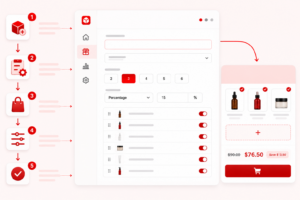
Can you bundle products on Shopify natively? Technically yes, but the native tools don’t give you the selection interface, discount logic, or inventory management that a proper mix and match bundle requires.
Most merchants who’ve tried to build a bundle Shopify setup manually end up with a workaround that’s harder to maintain than it looks. How to create product bundles on Shopify properly — with a customer-facing selection UI, automatic discount application, and inventory that syncs with individual product stock — requires a dedicated Shopify bundle app. BundleSuite is built for exactly this.
Here’s the basic setup flow:
Decide whether you’re running a quantity-based bundle (any 4 from this collection), a category-based kit (one from each of three categories), or a hybrid. BundleSuite supports all three without requiring separate configurations for each.
Choose which products or collections are eligible for inclusion. You can exclude out-of-stock items automatically, set minimum and maximum quantities per category, and restrict certain products to specific bundle types.
How to add bundle product in Shopify pricing is where most manual setups break down. BundleSuite handles tiered discounts (spend more, save more), flat bundle discounts, and percentage-off structures — applied at the bundle level rather than as individual product discounts, which keeps reporting clean.
The selection interface is where the customer experience lives. BundleSuite generates a dedicated bundle builder page with real-time progress tracking, image-forward product cards, and mobile-optimised layout.
How to bundle products in Shopify in a way that actually converts depends heavily on this interface working correctly on every device.
Before publishing, run through the bundle as a customer — check that the discount applies correctly, that inventory updates reflect bundle purchases, and that the confirmation email reflects the bundle contents accurately.
Getting customers to the bundle page is the easier half. Getting them to complete a selection and check out is where most Shopify mix and match bundles lose ground.
Visually showing progress (via “3 of 5 selected”) will motivate customers to complete a bundle when they see how much further they have to go. Customers need to know that they will not have to go back to the top of the screen to see their progress toward completing the bundle.
Mix and match bundles solve a problem that fixed bundles create: the assumption that one combination fits every customer.
When the format is set up correctly — with a clear structure, visible discount logic, and a selection interface that doesn’t require effort — it consistently lifts AOV, reduces abandonment, and creates a purchase experience customers actually enjoy. How to create product bundles in Shopify that work this way used to require custom development.
The right Shopify bundle app makes it a configuration problem instead. BundleSuite handles the builder, the pricing logic, and the inventory sync natively — so the strategic decisions, which products to offer, how to structure the tiers, how to frame the saving, stay the focus rather than the technical ones.
Want to create your own mix & match bundles in your Shopify shop? BundleSuite is an awesome tool for creating flexible bundles, providing real-time price reductions based on bundle calculations and giving customers an easy way to build their own bundles on your site. If you’ve been waiting on setting up Bundles because the setup process seemed daunting, we encourage you to try using BundleSuite as soon as possible!
At first, I was a bit worried since there weren’t many reviews yet, but I can confidently say this is an outstanding app with an amazing development team. There are many similar apps out there, but most of them are expensive and don’t offer a full set of features. This app, on the other hand, is currently free and already includes the functionality I was looking for. I also heard that a bundle duplication feature is coming soon, which shows how quickly the team listens and responds to user feedback.
Your email address will not be published. Required fields are marked*