7 min read
Jul 29, 2026
If you are working out how to migrate from Fast Bundle, here is the short answer: you do not have to do it yourself, and it does not have to take a weekend.
BundleSuite runs the Fast Bundle to BundleSuite migration for you. You book a call, our team learns how your bundles are set up and what they need to do, and we rebuild them manually inside BundleSuite. Most migrations are live within 24 hours. You do not export anything, rebuild anything, or touch a single quantity rule. There is also a time factor to be aware of. Shopify keeps app data for about 30 days post-uninstallation. So, if Fast Bundle is currently not active on your store, this 30-day time window has already started, and the sooner you document or rebuild your setup, the better.
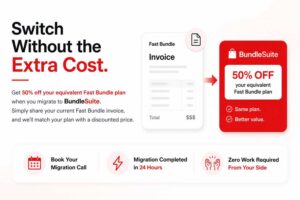
And because switching apps mid-quarter is a cost you did not plan for, we will give you 50% off your equivalent Fast Bundle rate. Bring your current invoice, and we will price against it.
Book your migration call | Migration completed in 24 hours | No work required from your side
Key Takeaways
This is the question that stops most merchants from acting, so here is the direct answer.
Not immediately. Shopify allows app data to be retained for up to 30 days following an uninstall, and Fast Bundle states that previous configurations are restored when merchants reinstall. Past that 30-day window, assume the data is gone.
So the real Fast Bundle uninstall data loss risk is not a vendor deleting your work. Instead, it comes from the fact that if there is a whole month without any record regarding how your bundles were created – then it is not good for your app if it is inactive during the delisting that happened back in July 2026.
There is no native export button either, which is why there is no clean answer on how to export bundles from Fast Bundle. Everything has to be captured manually or rebuilt from your product data. That is exactly the job we take off your plate.
| Factors | Do it yourself | BundleSuite done-for-you migration |
|
Who does the work |
You, bundle by bundle |
Our migration team |
|
Time required from you |
3 to 8 hours depending on library size |
One 30-minute call |
|
Typical time to live |
2 to 5 days |
Within 24 hours |
|
Risk of missed rules |
High, quantity and tier logic is easy to lose |
Low, we rebuild against your documented use case |
|
Storefront testing |
Your responsibility |
We test before handover |
|
Cost |
Standard plan pricing |
50% off your equivalent Fast Bundle rate |
|
What you need to prepare |
Full documentation of every bundle |
Your Fast Bundle invoice |
Most merchants who try the manual route stall at step one, because the rules that matter are the ones that were never written down.

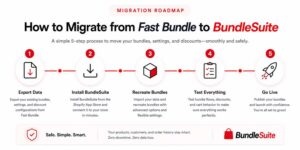
We intentionally do not use an automated import process. Every automated import is a replication of structure without replicating the point of it; that is how various businesses end up with many bundles that do exist in the system but do not have any actual work. We make our best effort to rebuild everything according to your particular needs.
|
Step |
What happens |
What you do |
|
1 |
You contact us and book a migration call |
Click the booking link, pick a slot |
|
2 |
A BundleSuite specialist joins the call, reviews your existing Fast Bundle setup, and maps every offer to its BundleSuite equivalent |
Walk us through what your bundles do and which ones drive revenue |
|
3 |
We rebuild your bundles manually inside BundleSuite, including discount tiers, quantity rules, and layout |
Nothing |
|
4 |
We test on your storefront and send it to you for approval | Review and approve |
| 5 | Your bundles go live, and we apply your 50% discount |
Uninstall Fast Bundle once you are happy |
The call matters more than it sounds. A bundle library is not just a list of products; it is a set of commercial decisions about margin, attach rate, and what you want shoppers to do next. Twenty minutes on a call captures that in a way no export file can.
That last point compounds with how BundleSuite is priced. Fast Bundle Shopify app pricing runs $19 for up to $1,000 in bundle revenue, $49 for up to $3,000, and $139 for up to $10,000. BundleSuite covers up to $5,000 at $29 and up to $10,000 at $49, before the migration discount is applied.
Every offer type you built in Fast Bundle has a direct equivalent. Nothing gets dropped.
|
Your Fast Bundle setup |
BundleSuite equivalent |
|
Mix and match |
Mix & Match and BYOB bundles, with min, max, and fixed quantity rules |
|
Bundle as product (combo) |
Standard Combo and Advanced Combo bundles |
|
Volume discount |
Quantity breaks and tiered volume discounts |
|
Buy X Get Y and BOGO |
BOGO and Buy X Get Y with progressive gift steps |
|
Product add-ons |
Bundle upsells and cross-sell deals |
|
Frequently bought together |
Frequently Bought Together app block on any product page |
|
Bundles exceeding variant limits |
Infinite options bundles, up to 2,048 variants |
Two things you gain in the move: every bundle gets its own indexable product page for SEO, and stock is tracked at real SKU level so fulfillment sees individual products rather than a phantom bundle SKU.
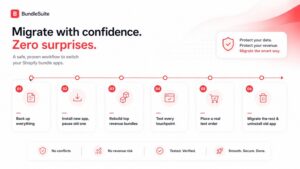
Some merchants want to handle it in-house, and that is fine. If you are moving from Fast Bundle to another app without help, this is how to switch Shopify bundle apps safely.
|
Step |
Action |
Why it matters |
|
1 |
Document every bundle: products, variants, quantity rules, discount tiers, customer conditions, dates |
This is your only backup. To backup Fast Bundle data before uninstalling, screenshots plus a spreadsheet are enough |
|
2 |
Install the new app, keep the old one installed but paused |
Two live bundle apps on the same products will conflict |
|
3 |
Rebuild your two highest-revenue bundles first |
Catches setup errors before they reach your whole catalog |
|
4 |
Test pricing, stock decrement, mobile layout, discount messaging, and checkout |
Storefront display and cart behavior fail in different ways |
|
5 |
Place a real test order and confirm fulfillment sees individual SKUs |
Bundle-level SKUs break picking and stock counts |
|
6 |
Migrate the rest, then uninstall the old app |
Uninstalling first means no rollback |
If you get halfway and would rather hand it over, the offer still applies.

Merchants delay a switch from Fast Bundle to BundleSuite primarily because they become worried that something might go wrong with the store, or they might lose a discount rule, or they would have to spend the entire weekend building a bundle library manually.
That is why we remove this concern completely from the process. You just have to book a call and tell us what functions your bundles should have; the company will then build them manually, check them, and send them to you live in under a day. The only thing you need to do is approve everything that goes live. You’ll also get a 50% discount off your standard Fast Bundle price.
If you would rather transfer Fast Bundle bundles to another app yourself, the manual steps above are genuinely all you need. If you would rather not, that is what we are here for.
What I love about BundleSuiite is the SEO impact. Each bundle has its own product page, which helps with marketing and driving organic traffic! This has opened up new opportunities for me to promote specific bundles and get them ranked on Google. The app is fast, flexible, and customer support is top-notch. My bundle sales have increased dramatically since I installed it.
Most stores are live within 24 hours of the migration call. Larger libraries with complex tiered logic can take slightly longer, and we will tell you on the call if that applies to you.
One call, roughly 30 minutes. After that, our team handles the rebuild, testing, and setup. You review and approve before anything goes live on your storefront.
Not straight away. Shopify retains app data for up to 30 days after uninstall. Past that, assume it is gone. We recommend keeping Fast Bundle installed but paused until your BundleSuite bundles are live and approved.
We can still help. Our team can reconstruct your bundles from your product data, order history, and what you tell us on the call.
Share your most recent Fast Bundle invoice, and we will apply 50% off your equivalent rate. Bring it to the migration call, and we will confirm the exact figure.
No, and it usually improves. Every BundleSuite bundle gets its own indexable product page, which is more than a widget-based setup gives you.
Yes. We build and test in the background while your existing setup stays as it is. Nothing changes for shoppers until you approve the handover.
Your email address will not be published. Required fields are marked*